








Mileage Reimbursement Form
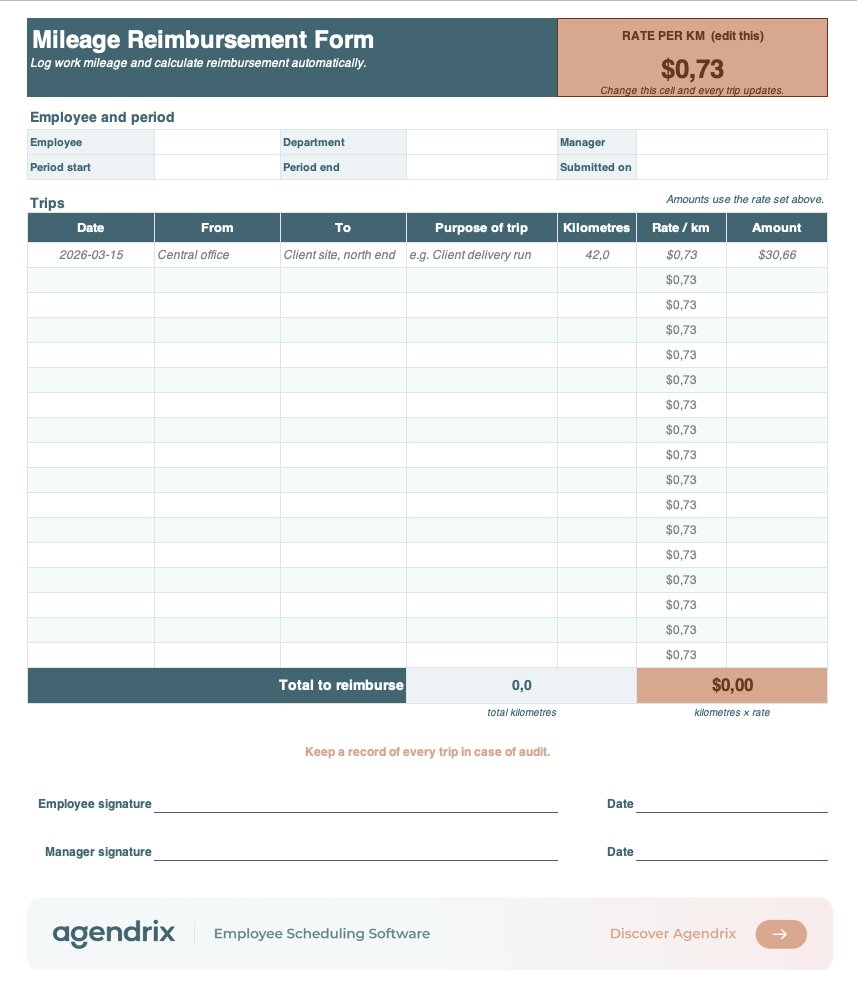
This free mileage reimbursement form lets employees log each trip, from origin to destination, and calculates the reimbursement automatically from the rate you set. Made for small and shift-based teams whose people move between sites, from home care to multi-location retail and delivery.

To which address should we send your resource?
What is a mileage reimbursement form?
A mileage reimbursement form is a document an employee uses to claim payback for the distance they drove in a personal vehicle for work. It lists each trip with the date, starting point, destination, purpose, and kilometres driven, then multiplies the distance by a set per-kilometre rate to reach a total. It gives businesses a clear, consistent record of who drove where, why, and how much is owed.
What’s the standard mileage reimbursement rate?
In Canada, the CRA sets a prescribed per-kilometre rate each year, with a lower rate past the first 5,000 kilometres.
How do you calculate mileage reimbursement?
Multiply the distance driven by the applicable per-kilometre rate. For example, 120 kilometres at a rate of $0.70 comes to $84.00. This form does that math automatically: enter your rate once, log the distance for each trip, and the total updates on its own.
Do employers have to reimburse mileage?
It depends on the jurisdiction. Some require reimbursement of work-related driving costs, while others leave it to the employer, subject to any employment agreement. Even where it isn’t mandatory, a clear written mileage policy paired with a consistent rate is the simplest way to stay fair and avoid disputes.
What records should employees keep?
A log of each trip: the date, starting point, destination, purpose, and distance. Tax authorities can ask for this record to support a reimbursement or a deduction, so it’s best recorded as trips happen rather than reconstructed later. This form doubles as that log.
How can you simplify mileage tracking for your team?
A template like this one standardizes how trips get submitted. But for teams driving across several sites, manual spreadsheets get hard to manage fast. Expense management software lets employees log trips from their phone and gives managers one place to review and approve them. Agendrix brings mileage submission and approval into the same platform your team already uses for scheduling and time tracking.