








Free Expense Report Template
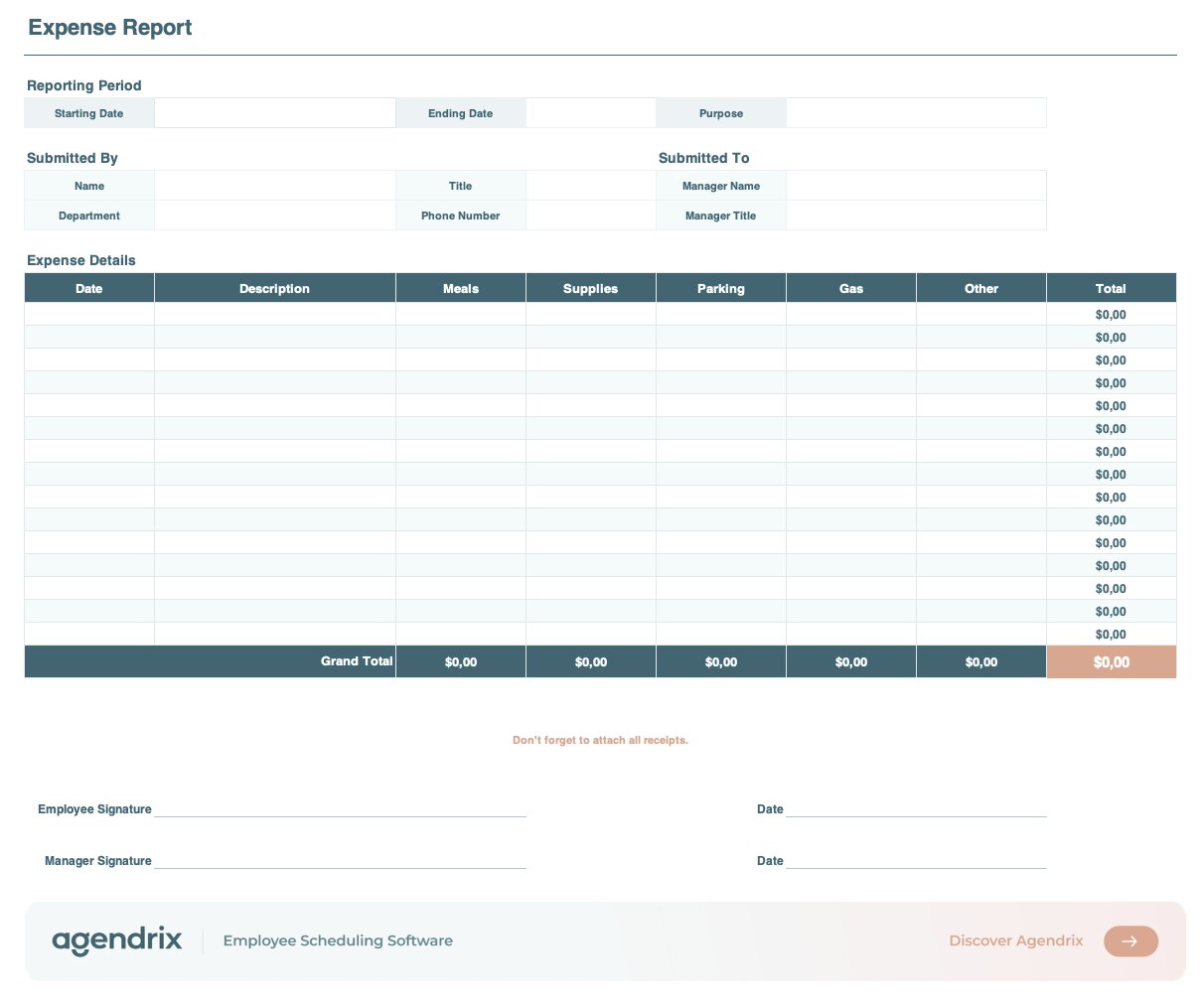
This free expense report template helps employees and managers track, submit, and approve business expenses in Excel. It includes a reporting period section, employee and manager fields, and a detailed expense table with auto-calculated category totals and a grand total. Each row covers common expense categories: lodging, meals, supplies, parking, and gas. Simply fill in your amounts and the totals update automatically. A “How to Use It” tab walks you through every section. Ideal for small businesses looking to standardize expense reporting without dedicated software.

To which address should we send your resource?
What is an expense report?
An expense report is a document an employee uses to record business-related costs and request reimbursement from their employer, typically within a small or mid-sized business. It typically includes the date, a short description of each expense, the amount, and the category it falls under (such as meals, lodging, or transportation). Most organizations require supporting receipts for every item listed. Expense reports help businesses track spending, stay on budget, and keep clear records for tax and accounting purposes.
What should you include in an expense report?
Every expense report should include the reporting period, the employee’s name and department, and the manager who will approve it. For each expense, list the date, a brief description, and the amount. Attach the matching receipt for every line item. Most companies also require a signature from both the employee and the approving manager before the report is processed.
What categories should an expense report include?
Common categories include mileage and transportation, parking, supplies and equipment, meals (for training, events, or travel), uniforms or PPE for businesses that require them, and lodging for roles involving overnight travel. The right categories depend on your industry and internal policy. This template covers five widely used categories: lodging, meals, supplies, parking, and gas. If an expense doesn’t fit cleanly, use the closest match and add a note in the description field.
How does expense reimbursement work?
The typical process has three steps:
- The employee fills out the expense report and attaches receipts.
- The manager reviews and approves the submission.
- Finance or payroll processes the reimbursement on the next pay cycle.
Turnaround varies, but most small businesses aim to reimburse within two to four weeks.
What’s the difference between an expense report and an expense reimbursement form?
They overlap, but the distinction is one of scope and purpose. An expense report is a broader document that lists multiple business expenses over a set period (often a week or month), grouped by category, and used for accounting and tax tracking. An expense reimbursement form is typically simpler and more transactional, focused on requesting payback for specific expenses, often with receipts attached. Some businesses use the two terms interchangeably; the right choice depends on how formal your process needs to be.
Are employers required to reimburse employee expenses?
It depends on your jurisdiction. In the U.S., federal law doesn’t always require reimbursement, but several states (including California, Illinois, and New York) do. In Canada, employers generally can’t pass operating costs onto employees, though rules vary by province. As a best practice, most employers reimburse legitimate work-related expenses to stay compliant and keep employees engaged.
How long does an employer have to reimburse an employee?
Most employers reimburse expenses on the next pay cycle, with a typical turnaround of 2 to 4 weeks. Some jurisdictions set explicit deadlines (for example, California requires reimbursement within 30 days of submission), while others leave it to internal policy. To avoid disputes and keep employees engaged, set a clear reimbursement timeline in your employee handbook and stick to it.
Are expense reimbursements taxable?
Generally, no, as long as the reimbursement is for legitimate business expenses and the employee provides proper documentation. In the U.S., the IRS calls this an “accountable plan”: reimbursements that meet the rules aren’t reported as taxable income. The Canada Revenue Agency follows similar principles. If receipts aren’t required or expenses aren’t clearly business-related, the payment can be treated as taxable wages, which is why a clear policy and proper documentation matter.
How can you simplify expense reporting for your team?
A template like this one is a good starting point to standardize how your team submits expenses. But for small businesses with hourly or shift-based teams, manual spreadsheets get messy fast, especially when employees work across multiple locations or rotating shifts.
Expense management software lets employees submit expenses directly from their phone, attach receipt photos on the spot, and gives managers a single place to review and approve everything. It cuts down on paperwork, speeds up reimbursement, and keeps records clean even when your team is spread across sites and schedules.