

Key takeaways
- Expense reimbursement is how an employee gets paid back for a cost they covered for work: meals, travel, supplies. Handled well, it’s fast and transparent. Handled poorly, it eats up time at every payroll run.
- The real problem is almost never the expense itself. It’s the process around it: submission, approval, tracking, and reimbursement scattered across texts, emails, and spreadsheets.
- Three levers make expense management work: a clear policy, a simple submission and approval process, and one tool that centralizes everything.
- For shift workers, a mobile tool changes the game. The employee snaps a photo of the receipt in the field, the manager approves it at a glance, and the amount carries straight through to payroll.
Between two shifts, an employee texts you a photo of a receipt. Three weeks later, at payroll, you dig through your messages and can’t find the exact amount. When expense reimbursement runs on memory and scraps of paper, it always ends up costing you time. Here’s how to make it simple, clear, and reliable.
Expense reimbursement: what it actually means
An expense reimbursement pays an employee back for costs they take on as part of their job and are entitled to get back: lunch with a customer, gas or mileage for a trip, a supply order, a hotel fee during an out of town training. The employee pays out of pocket, and the company pays them back once they submit a receipt.
Simple in principle. Where it gets complicated is the mechanics: who submits what, who approves it, within what timeframe, and how all of that makes its way to payroll without a receipt going missing.
The expense isn’t the problem. The problem is everything that happens between the moment the employee pulls out their card and the moment they see their money again.
Why expense management is a headache for SMBs

In an office work setting, submitting an expense means opening a file between two emails. In a restaurant, a clinic, a shop, or on a job site, employees are in the field and rarely have access to a computer or their email.
The employee is either on the move or between two customers. So they snap a photo of the receipt, text it over, and move on.
A few weeks later, the manager is left piecing together the puzzle: one receipt in their texts, another in an email, an amount jotted in a spreadsheet opened two weeks ago, and a vague memory of who submitted what. It’s not that anyone’s being careless. It’s a process problem.
The fallout adds up fast:
- Late reimbursements. An employee waiting weeks for their money gets discouraged, and some give up on claiming altogether.
- Payroll errors. Missing receipts, ballpark amounts, double reimbursements: every rough guess costs you time to fix later.
- Zero visibility. There’s no way to know, mid-month, how much the team has spent.
- Risk at audit time. Without properly filed supporting documents, responding to a CRA request turns into a scavenger hunt.
Best practices for structuring your expense reimbursements
The good news: you don’t need a finance department to manage expenses well. Three levers are enough, and they hold up even for a team of ten.
1. Write a clear expense policy
Before even thinking about tools, put the ground rules in writing. An expense policy doesn’t need to be a twenty-page document. It needs to answer four questions:
- Which expenses are reimbursable? Business meals, travel, mileage, supplies, training. Be specific about the edge cases (a coffee on its own, a solo meal, alcohol).
- What are the limits? For example, a cap per meal or a monthly travel budget. A limit keeps things from getting out of hand.
- How does reimbursement happen? By direct deposit, on the next paycheck, within a set timeframe.
- How often should people submit? Setting a deadline (say, the 25th of the month) makes processing easier and prevents the end-of-month pile-up.
💡 Tip: the sooner an expense is submitted after it’s incurred, the fewer errors there are.
2. Simplify submission and approval
The golden rule: if submitting an expense is a hassle, employees will put it off, and that’s when receipts get lost. The goal is to cut the task down to the bare minimum: a photo, a category, a send.
On the approval side, the manager should be able to handle each request in seconds, ideally as they come in rather than in one batch at month-end. Dealing with an expense while the context is still fresh is how you get it right.
3. Centralize everything in one place
As long as expenses live across three or four different channels (texts, emails, files, paper), no policy will stick. Centralizing means having a single list where every request shows up with its receipt, amount, category, and status. If you’re starting from scratch, an expense report template already gives you a starting structure to gather this information in one place. That’s what makes real-time tracking and a clean export to payroll possible.
It’s also what protects the company. When supporting documents are properly filed and one click away, a tax audit becomes a formality.
Spreadsheet, paper, or software: which tool for managing expense reimbursements?
Most SMBs start with whatever they have on hand. That’s normal, but each approach has its limits.
| Approach | Upsides | Limits |
|---|---|---|
| Paper and texts | No cost, no setup | Lost receipts, no tracking, manual reconstruction at payroll |
| Spreadsheet | Low cost, familiar, customizable | Manual entry, formula errors, no receipts attached, no real-time tracking |
| Expense management software | Receipt photo, automatic scanning, centralized approval, export to payroll | Subscription cost, learning curve, and one more tool to manage if it isn’t already integrated with your other systems |
A spreadsheet does the job early on. But as soon as the team grows or travel ramps up, manual entry becomes a source of errors and wasted time. That’s usually the point where a dedicated tool starts to pay for itself.
What if expense management lived in the app your team already uses?


Most expense management tools are separate platforms, something to learn and connect to the rest. Agendrix takes a different approach: expense management is a module that lives inside the app your team already opens every day for their schedules and timesheets.
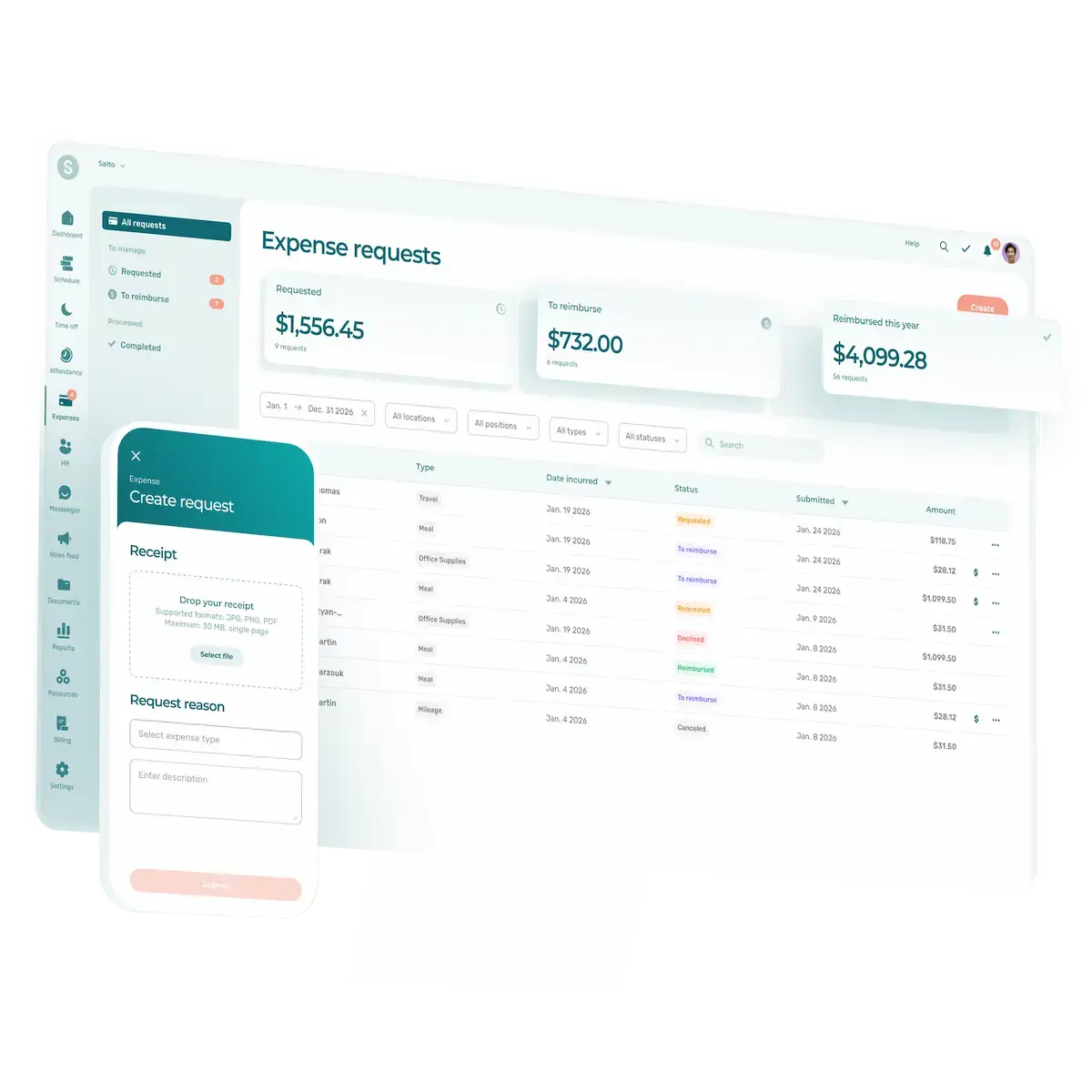
Here’s how it works. The employee photographs their receipt from their phone. The app reads the receipt and fills in the request automatically: amount, date, merchant. They confirm, pick the expense type, and submit. The manager sees every request in a single list, approves with one click, and approved amounts export to payroll alongside hours and bonuses.
No new tool to learn, no more receipts lost along the way. Everything stays in one place, from the field all the way to payroll.
Manage expensereimbursements well, get your time back
A well-managed expense isn’t just a receipt filed in the right spot. It’s an employee reimbursed without having to ask twice, a manager who no longer digs through their texts when payroll comes, and a company that knows where its money is going in real time. At the end of the day, structuring your expense reimbursements gives your team back the time they used to spend chasing scraps of paper.
What is an expense reimbursement?
An expense reimbursement is how an employee gets paid back for a cost they covered for work: a business meal, travel, mileage, supplies, training. The employee fronts the money and the company pays them back once they provide a supporting document.
How do you manage employee expenses in an SMB?
Three levers are enough: a clear expense policy (which expenses, what limits, what timeframe), a simple submission and approval process, and one tool that centralizes requests and receipts. For frontline teams or shift work, a mobile tool that lets employees photograph receipts in the field means far fewer missed claims.
What's the difference between an expense policy and an expense reimbursement?
An expense reimbursement is the individual cost to be paid back. An expense policy is the full set of rules that governs those reimbursements across the whole company: what’s eligible, the caps, the timeframes, and the repayment method.
How long should an expense reimbursement take?
There’s no single legal deadline, but speed is a motivator. What matters is setting a clear timeframe in your policy (for example, on the next paycheck or within 30 days) and sticking to it. The smoother the process, the faster the reimbursement, the happier the staff.
Are employee expenses tax-deductible?
Many expenses incurred in the interest of the business can be deductible, but the rules depend on the nature of the expense and the applicable legislation. The CRA sets out which business expenses are eligible. Always keep your supporting documents and check specific cases with your accountant.